Blog on GitHub with Hexo and Icarus theme

I wanted to create a simple blog for documentation and how-to tutorials. I would be writing in markup language, as I am using GitHub repositories. I would also like to have automated the posting dates, menus, tags, navigation and have an adapted view for mobile devices.

I will not be thorough, just dot the guidelines and changes I had to make to the references below, due to updated software and my specific Linux host OS (Fedora 23). For additional information, links are provided in each chapter.

  1. Prerequisites
  2. Setting up Hexo with GitHub
  3. References and Credits
  4. Summary

1. Prerequisites

Install Git

You can check updated details in “Getting Started - Installing Git“.

  • Linux (Ubuntu, Debian): sudo apt install git-all
  • Linux (Fedora, Red Hat, CentOS): sudo dnf install git-all
  • Windows: Download & install git.
  • Mac: Download & install git.

Install Node.js

As suggested in “How to install Node.js” the best way to install Node.js is with nvm (https://github.com/nvm-sh/nvm).

To install or update nvm, you should run the install script. To do that, you may either download and run the script manually, or use the following cURL or Wget command:

curl -o- https://raw.githubusercontent.com/nvm-sh/nvm/v0.35.3/install.sh | bash

wget -qO- https://raw.githubusercontent.com/nvm-sh/nvm/v0.35.3/install.sh | bash

Once nvm is installed, restart the terminal and run the following command to install Node.js (you can check latest available versions in https://nodejs.org/ but I would recommend to let nvm to automatically select the latest LTS version for you):

1
nvm install --lts

You can check the installed version with nvm current or nvm alias. This is the output:

1
2
3
4
5
6
7
8
9
10
11
12
13
14
15
16
17
18
19
20
21
22
23
[barond@fedora]$ nvm install --lts
Installing latest LTS version.
Downloading and installing node v12.16.3...
Downloading https://nodejs.org/dist/v12.16.3/node-v12.16.3-linux-x64.tar.xz...
########################################################################################################################################### 100.0%
Computing checksum with sha256sum
Checksums matched!
Now using node v12.16.3 (npm v6.14.4)
Creating default alias: default -> lts/* (-> v12.16.3)
[barond@fedora]$ nvm current
v12.16.3
[barond@fedora]$ nvm alias
default -> lts/* (-> v12.16.3)
node -> stable (-> v12.16.3) (default)
stable -> 12.16 (-> v12.16.3) (default)
iojs -> N/A (default)
unstable -> N/A (default)
lts/* -> lts/erbium (-> v12.16.3)
lts/argon -> v4.9.1 (-> N/A)
lts/boron -> v6.17.1 (-> N/A)
lts/carbon -> v8.17.0 (-> N/A)
lts/dubnium -> v10.20.1 (-> N/A)
lts/erbium -> v12.16.3

Hexo installation

Once all the requirements are installed, you can install Hexo with npm. Detailed and advanced procedure is explained here: https://hexo.io/docs/#Install-Hexo.

1
npm install -g hexo-cli

This is the output:

1
2
3
4
5
6
7
[barond@fedora ~]$ npm install -g hexo-cli
/home/barond/.nvm/versions/node/v12.16.3/bin/hexo -> /home/barond/.nvm/versions/node/v12.16.3/lib/node_modules/hexo-cli/bin/hexo
npm WARN optional SKIPPING OPTIONAL DEPENDENCY: fsevents@~2.1.2 (node_modules/hexo-cli/node_modules/chokidar/node_modules/fsevents):
npm WARN notsup SKIPPING OPTIONAL DEPENDENCY: Unsupported platform for fsevents@2.1.3: wanted {"os":"darwin","arch":"any"} (current: {"os":"linux","arch":"x64"})

+ hexo-cli@3.1.0
added 81 packages from 322 contributors in 7.941s

Set up a GitHub repository

Set up a github repo with the name: {github_user_name}.github.io.

In my case it was barondandi.github.io

If you did it right you should be able to access the webpage https://{github_user_name}.github.io

In my case it is https://barondandi.github.io

If you need extra help detailed procedure is explained in “Creating a GitHub Pages site” (https://help.github.com/en/github/working-with-github-pages/creating-a-github-pages-site).

2. Setting up Hexo with GitHub

Setup a blog

We will generate the a {blogname} folder and install dependencies with the following commands:

1
2
3
4
hexo init {blogname}
cd {blogname}
npm i
git init

NOTE: In our case the {blogname} will be the previously created repository ({github_user_name}.github.io)

More information of Hexo commands here https://hexo.io/docs/commands

This is the output:

1
2
3
4
5
6
7
8
9
10
11
12
13
14
15
16
17
18
19
20
21
22
23
24
25
26
27
28
29
30
31
32
33
34
35
36
37
38
39
[barond@fedora BLOG]$ hexo init barondandi.github.io
INFO Cloning hexo-starter https://github.com/hexojs/hexo-starter.git
Cloning into '/home/barond/BLOG/barondandi.github.io'...
remote: Enumerating objects: 30, done.
remote: Counting objects: 100% (30/30), done.
remote: Compressing objects: 100% (24/24), done.
remote: Total 161 (delta 12), reused 12 (delta 4), pack-reused 131
Receiving objects: 100% (161/161), 31.79 KiB | 452.00 KiB/s, done.
Resolving deltas: 100% (74/74), done.
Submodule 'themes/landscape' (https://github.com/hexojs/hexo-theme-landscape.git) registered for path 'themes/landscape'
Cloning into '/home/barond/BLOG/barondandi.github.io/themes/landscape'...
remote: Enumerating objects: 4, done.
remote: Counting objects: 100% (4/4), done.
remote: Compressing objects: 100% (4/4), done.
remote: Total 1067 (delta 0), reused 0 (delta 0), pack-reused 1063
Receiving objects: 100% (1067/1067), 3.22 MiB | 3.84 MiB/s, done.
Resolving deltas: 100% (585/585), done.
Submodule path 'themes/landscape': checked out '73a23c51f8487cfcd7c6deec96ccc7543960d350'
INFO Install dependencies
npm WARN deprecated urix@0.1.0: Please see https://github.com/lydell/urix#deprecated
npm WARN deprecated resolve-url@0.2.1: https://github.com/lydell/resolve-url#deprecated
> ejs@2.7.4 postinstall /home/vfranco/BLOG/barondandi.github.io/node_modules/ejs
> node ./postinstall.js
Thank you for installing EJS: built with the Jake JavaScript build tool (https://jakejs.com/)
npm notice created a lockfile as package-lock.json. You should commit this file.
npm WARN optional SKIPPING OPTIONAL DEPENDENCY: fsevents@~2.1.2 (node_modules/chokidar/node_modules/fsevents):
npm WARN notsup SKIPPING OPTIONAL DEPENDENCY: Unsupported platform for fsevents@2.1.3: wanted {"os":"darwin","arch":"any"} (current: {"os":"linux","arch":"x64"})
added 253 packages from 450 contributors and audited 470 packages in 8.241s
INFO Start blogging with Hexo!

[barond@fedora BLOG]$ cd barondandi.github.io

[barond@fedora barondandi.github.io]$ npm i
npm WARN optional SKIPPING OPTIONAL DEPENDENCY: fsevents@2.1.3 (node_modules/fsevents):
npm WARN notsup SKIPPING OPTIONAL DEPENDENCY: Unsupported platform for fsevents@2.1.3: wanted {"os":"darwin","arch":"any"} (current: {"os":"linux","arch":"x64"})
audited 470 packages in 1.3s

[barond@fedora barondandi.github.io]$ git init
Initialized empty Git repository in /home/vfranco/BLOG/barondandi.github.io/.git/

Install a theme

You have a lot of Hexo themes to choose from here https://hexo.io/themes/.

Once you decide your mind, fork it to customize it or just get the GitHub repo url from the theme info.

1
git submodule add {theme-github-url} themes/{theme-name}

You have the installation instructions inside each of the themes, for example, you could check this one: https://github.com/klugjo/hexo-theme-clean-blog

I will be using another theme: https://github.com/ppoffice/hexo-theme-icarus

You can find detailed installation instructions in “Getting Started with Icarus” (https://blog.zhangruipeng.me/hexo-theme-icarus/uncategorized/getting-started-with-icarus/)

We will install Icarus as a Git submodule with the following command:

1
git submodule add https://github.com/ppoffice/hexo-theme-icarus.git themes/icarus

Edit YAML configuration files

You can modify the files using vi, nano, Hexo commands (https://hexo.io/docs/commands) or any text editor you feel comfortable with.

NOTE: I would recommend Atom or Visual Studio, as they come with a lot of plugins that make life a lot easier.

We start by editing the _config.yml file in the main folder. A description of all the parameters we can change is here: https://hexo.io/docs/configuration.

Some themes may have an example configuration file, so we would start by copying that theme example file to the _config.yml file in the theme folder:

1
cp themes/{theme-name}/_config.yml.example themes/{theme-name}/_config.yml

NOTE: Some themes may differ on _config.yml.example file name. Refer to the theme docs. In our case, Icarus’ default theme configuration file is themes/icarus/_config.yml, so there is nothing to do (if you don’t find it, it will be created during deployment).

Now we need to update _config.yml on the project root folder to use newly installed theme. (Don’t get confused with the theme config file on the theme folder).

1
nano _config.yml

We look for the “theme:” attribute and change it. In our case, I will be changing the default theme: landscape for theme: icarus.

This is the aspect of that part of the _config.yml configuration file:

1
2
3
4
# Extensions
## Plugins: https://hexo.io/plugins/
## Themes: https://hexo.io/themes/
theme: icarus

Other option is to use the hexo command to change the theme to Icarus:

1
hexo config theme {theme-name}

Now we configure blog parameters and deployment information:

We keep on editing _config.yml in root repository folder (Don’t get confused with the theme config file), and update blog info as desired.

1
nano _config.yml

This is the aspect of that part of the _config.yml configuration file:

1
2
3
4
5
6
7
8
9
10
11
# Site
title: Baron D Blog
subtitle: ''
description: ''
keywords:
author: Baron D
language: en
timezone: Europe/Madrid

# URL
url: https://barondandi.github.io/

Add below code at the bottom of the file for deploy on github repo (https://hexo.io/docs/one-command-deployment).

1
2
3
4
5
6
7
# Deployment
## Docs: https://hexo.io/docs/deployment.html
deploy:
type: git
repo: {your github repo url}
branch: master
message: "Site updated: {{ now('YYYY-MM-DD HH:mm:ss') }}"

Now it is a good time to review and modify the theme themes/{theme-name}/_config.yml file in the theme folder. for this, refer to the theme docs.

In our case, Icarus theme had resources missing, but they will be created during the first deployment, and we will revisit this point afterwards.

Deploy the blog

Now we can deploy the blog:

1
2
npm i -S hexo-deployer-git
hexo deploy

In our case we had some issues due to missing dependencies, but we run the specified command and had it corrected. This is the output:

1
2
3
4
5
6
7
8
9
10
11
12
13
14
15
16
17
18
19
20
21
22
23
24
25
26
27
28
29
30
31
32
33
34
35
36
37
38
39
40
41
42
43
44
45
46
47
48
49
50
51
52
53
54
55
56
57
58
59
60
61
62
63
64
65
66
67
68
69
70
71
72
73
74
75
76
77
78
79
80
81
82
83
84
85
86
87
88
89
90
91
92
93
94
95
96
97
98
99
100
101
102
103
104
105
106
107
108
109
110
111
112
113
114
115
116
117
118
119
120
121
122
123
124
125
126
127
128
129
130
131
[barond@fedora barondandi.github.io]$ npm i -S hexo-deployer-git
npm WARN optional SKIPPING OPTIONAL DEPENDENCY: fsevents@2.1.3 (node_modules/fsevents):
npm WARN notsup SKIPPING OPTIONAL DEPENDENCY: Unsupported platform for fsevents@2.1.3: wanted {"os":"darwin","arch":"any"} (current: {"os":"linux","arch":"x64"})
+ hexo-deployer-git@2.1.0
added 1 package from 1 contributor and audited 570 packages in 3.717s

[barond@fedora barondandi.github.io]$ hexo deploy
INFO =======================================
██╗ ██████╗ █████╗ ██████╗ ██╗ ██╗███████╗
██║██╔════╝██╔══██╗██╔══██╗██║ ██║██╔════╝
██║██║ ███████║██████╔╝██║ ██║███████╗
██║██║ ██╔══██║██╔══██╗██║ ██║╚════██║
██║╚██████╗██║ ██║██║ ██║╚██████╔╝███████║
╚═╝ ╚═════╝╚═╝ ╚═╝╚═╝ ╚═╝ ╚═════╝ ╚══════╝
=============================================
INFO === Checking package dependencies ===
ERROR Package bulma-stylus is not installed.
ERROR Package hexo-component-inferno is not installed.
ERROR Package hexo-renderer-inferno is not installed.
ERROR Package inferno is not installed.
ERROR Package inferno-create-element is not installed.
ERROR Please install the missing dependencies your Hexo site root directory:
ERROR npm install --save bulma-stylus@0.8.0 hexo-component-inferno@^0.2.4 hexo-renderer-inferno@^0.1.3 inferno@^7.3.3 inferno-create-element@^7.3.3

[barond@fedora barondandi.github.io]$npm install --save bulma-stylus@0.8.0 hexo-component-inferno@^0.2.4 hexo-renderer-inferno@^0.1.3 inferno@^7.3.3 inferno-create-element@^7.3.3
> inferno@7.4.2 postinstall /home/vfranco/BLOG/barondandi.github.io/node_modules/inferno
> opencollective-postinstall
Thank you for using inferno!
If you rely on this package, please consider supporting our open collective:
> https://opencollective.com/inferno/donate
npm WARN optional SKIPPING OPTIONAL DEPENDENCY: fsevents@2.1.3 (node_modules/fsevents):
npm WARN notsup SKIPPING OPTIONAL DEPENDENCY: Unsupported platform for fsevents@2.1.3: wanted {"os":"darwin","arch":"any"} (current: {"os":"linux","arch":"x64"})
+ inferno-create-element@7.4.2
+ hexo-renderer-inferno@0.1.3
+ hexo-component-inferno@0.2.5
+ bulma-stylus@0.8.0
+ inferno@7.4.2
added 167 packages from 79 contributors and audited 2626 packages in 22.329s

[barond@fedora barondandi.github.io]$ hexo deploy
Inferno is in development mode.
INFO =======================================
██╗ ██████╗ █████╗ ██████╗ ██╗ ██╗███████╗
██║██╔════╝██╔══██╗██╔══██╗██║ ██║██╔════╝
██║██║ ███████║██████╔╝██║ ██║███████╗
██║██║ ██╔══██║██╔══██╗██║ ██║╚════██║
██║╚██████╗██║ ██║██║ ██║╚██████╔╝███████║
╚═╝ ╚═════╝╚═╝ ╚═╝╚═╝ ╚═╝ ╚═════╝ ╚══════╝
=============================================
INFO === Checking package dependencies ===
INFO === Checking the configuration file ===
WARN /home/barond/BLOG/barondandi.github.io/themes/icarus/_config.yml is not found. We are creating one for you...
INFO You may add '--icarus-dont-generate-config' to prevent creating the configuration file.
INFO /home/barond/BLOG/barondandi.github.io/themes/icarus/_config.yml created successfully.
INFO === Registering Hexo extensions ===
INFO Start processing
INFO Files loaded in 2.02 s
INFO Generated: content.json
INFO Generated: index.html
INFO Generated: js/algolia.js
INFO Generated: js/google_cse.js
INFO Generated: js/insight.js
INFO Generated: archives/index.html
INFO Generated: categories/index.html
INFO Generated: tags/index.html
INFO Generated: img/avatar.png
INFO Generated: js/animation.js
INFO Generated: js/main.js
INFO Generated: js/back_to_top.js
INFO Generated: img/favicon.svg
INFO Generated: img/thumbnail.svg
INFO Generated: img/razor-top-black.svg
INFO Generated: img/og_image.png
INFO Generated: img/logo.svg
INFO Generated: img/razor-bottom-black.svg
INFO Generated: archives/2020/05/index.html
INFO Generated: archives/2020/index.html
INFO Generated: css/cyberpunk.css
INFO Generated: css/default.css
INFO Generated: css/style.css
INFO Generated: 2020/05/08/hello-world/index.html
INFO 24 files generated in 3.72 s
INFO Deploying: git
INFO Setting up Git deployment...
Initialized empty Git repository in /home/barond/BLOG/barondandi.github.io/.deploy_git/.git/
[master (root-commit) 51404b1] First commit
1 file changed, 0 insertions(+), 0 deletions(-)
create mode 100644 placeholder
INFO Clearing .deploy_git folder...
INFO Copying files from public folder...
INFO Copying files from extend dirs...
[master 10af56e] Site updated: 2020-05-08 02:56:51
25 files changed, 35831 insertions(+)
create mode 100644 2020/05/08/hello-world/index.html
create mode 100644 archives/2020/05/index.html
create mode 100644 archives/2020/index.html
create mode 100644 archives/index.html
create mode 100644 categories/index.html
create mode 100644 content.json
create mode 100644 css/cyberpunk.css
create mode 100644 css/default.css
create mode 100644 css/style.css
create mode 100644 img/avatar.png
create mode 100644 img/favicon.svg
create mode 100644 img/logo.svg
create mode 100644 img/og_image.png
create mode 100644 img/razor-bottom-black.svg
create mode 100644 img/razor-top-black.svg
create mode 100644 img/thumbnail.svg
create mode 100644 index.html
create mode 100644 js/algolia.js
create mode 100644 js/animation.js
create mode 100644 js/back_to_top.js
create mode 100644 js/google_cse.js
create mode 100644 js/insight.js
create mode 100644 js/main.js
delete mode 100644 placeholder
create mode 100644 tags/index.html
Username for 'https://github.com': barondandi
Password for 'https://barondandi@github.com':
Enumerating objects: 40, done.
Counting objects: 100% (40/40), done.
Delta compression using up to 4 threads
Compressing objects: 100% (31/31), done.
Writing objects: 100% (40/40), 125.20 KiB | 5.96 MiB/s, done.
Total 40 (delta 8), reused 0 (delta 0)
remote: Resolving deltas: 100% (8/8), done.
To https://github.com/barondandi/barondandi.github.io.git
+ b309212...10af56e HEAD -> master (forced update)
Branch 'master' set up to track remote branch 'master' from 'https://github.com/barondandi/barondandi.github.io.git'.
INFO Deploy done: git

At this point, you should be able to see your blog at http://{blogname}.github.io.

Now we may want to edit the theme configuration file on themes/{theme-name}_config.yml. For our chosen theme, detailed information is in the “Icarus User Guide - Configuring the Theme” (https://blog.zhangruipeng.me/hexo-theme-icarus/Configuration/icarus-user-guide-configuring-the-theme/)

1
nano themes/{theme-name}/_config.yml

Add the source to the GitHub repository (optional)

Optionally, you might want to maintain a different version of the code, you could make another branch and push the commits there instead of to the default “master” branch.

We will be creating another branch called “source” and pushing there the commits.

1
2
3
git remote add origin {your-git-repo-url}
git checkout -b source
git push origin source

This is the output:

1
2
3
4
5
6
7
8
9
10
11
12
13
14
15
16
17
18
19
20
21
[barond@fedora barondandi.github.io]$ git remote add origin https://github.com/barondandi/barondandi.github.io.git

[barond@fedora barondandi.github.io]$ git checkout -b source
Switched to a new branch 'source'

[barond@fedora barondandi.github.io]$ git push origin source
Username for 'https://github.com': barondandi
Password for 'https://barondandi@github.com':
Enumerating objects: 120, done.
Counting objects: 100% (120/120), done.
Delta compression using up to 4 threads
Compressing objects: 100% (111/111), done.
Writing objects: 100% (120/120), 560.91 KiB | 5.55 MiB/s, done.
Total 120 (delta 4), reused 0 (delta 0)
remote: Resolving deltas: 100% (4/4), done.
remote:
remote: Create a pull request for 'source' on GitHub by visiting:
remote: https://github.com/barondandi/barondandi.github.io/pull/new/source
remote:
To https://github.com/barondandi/barondandi.github.io.git
* [new branch] source -> source

Deploy a new post

Adding a new post

1
hexo new {postname}

More info: Writing

Edit the new post file

1
nano source/_posts/{postname}.md

Check existing posts

1
hexo list post

Run server

1
$ hexo server

More info: Server

Generate static files

1
$ hexo generate

More info: Generating

Deploy to remote sites

1
$ hexo deploy

More info: Deployment

OR Regenerate files and deploy at once

1
hexo generate -d

Removing a post

As there is no command to delete a post on Hexo, we need to follow this steps :

  1. Delete the post under source/_post folder
    1. (OPTIONAL) Run hexo clean to delete the database (db.json) and assets folder. Make sure to back-up any content that you have posted inside “public” folder as it will be purged as well (for example images).
  2. Run hexo generate to generate the new blog without your deleted post
  3. Run hexo deploy to deploy your blog

This is the output:

1
2
3
4
5
6
7
8
9
10
11
12
13
14
15
16
17
18
19
20
21
22
23
24
25
26
27
28
29
30
31
32
33
34
35
36
37
38
39
40
41
42
43
44
45
46
47
48
49
50
51
52
53
54
55
56
57
58
59
60
61
62
63
64
65
66
67
68
69
70
71
72
73
74
75
76
77
78
79
80
81
82
83
84
85
86
87
88
89
90
91
92
93
94
95
96
97
98
99
100
101
102
103
104
105
106
107
108
109
110
111
112
113
114
115
116
117
118
119
120
121
122
123
124
125
126
127
128
129
130
131
132
133
134
135
136
137
[barond@fedora barondandi.github.io]$ hexo new install-hexo
Inferno is in development mode.
INFO =======================================
██╗ ██████╗ █████╗ ██████╗ ██╗ ██╗███████╗
██║██╔════╝██╔══██╗██╔══██╗██║ ██║██╔════╝
██║██║ ███████║██████╔╝██║ ██║███████╗
██║██║ ██╔══██║██╔══██╗██║ ██║╚════██║
██║╚██████╗██║ ██║██║ ██║╚██████╔╝███████║
╚═╝ ╚═════╝╚═╝ ╚═╝╚═╝ ╚═╝ ╚═════╝ ╚══════╝
=============================================
INFO === Checking package dependencies ===
INFO === Checking the configuration file ===
INFO === Registering Hexo extensions ===
INFO Created: ~/BLOG/barondandi.github.io/source/_posts/install-hexo.md

[barond@fedora barondandi.github.io]$ nano source/_posts/install-hexo.md

[barond@fedora barondandi.github.io]$ hexo list post
Inferno is in development mode.
INFO =======================================
██╗ ██████╗ █████╗ ██████╗ ██╗ ██╗███████╗
██║██╔════╝██╔══██╗██╔══██╗██║ ██║██╔════╝
██║██║ ███████║██████╔╝██║ ██║███████╗
██║██║ ██╔══██║██╔══██╗██║ ██║╚════██║
██║╚██████╗██║ ██║██║ ██║╚██████╔╝███████║
╚═╝ ╚═════╝╚═╝ ╚═╝╚═╝ ╚═╝ ╚═════╝ ╚══════╝
=============================================
INFO === Checking package dependencies ===
INFO === Checking the configuration file ===
INFO === Registering Hexo extensions ===
INFO Start processing
Date Title Path Category Tags
2020-05-08 Hello World _posts/hello-world.md
2020-05-08 Blog on GitHub with Hexo and Icarus theme _posts/install-hexo.md blog Hexo Icarus GitHub

[barond@fedora barondandi.github.io]$ rm source/_posts/hello-world.md

[barond@fedora barondandi.github.io]$ hexo clean
Inferno is in development mode.
INFO =======================================
██╗ ██████╗ █████╗ ██████╗ ██╗ ██╗███████╗
██║██╔════╝██╔══██╗██╔══██╗██║ ██║██╔════╝
██║██║ ███████║██████╔╝██║ ██║███████╗
██║██║ ██╔══██║██╔══██╗██║ ██║╚════██║
██║╚██████╗██║ ██║██║ ██║╚██████╔╝███████║
╚═╝ ╚═════╝╚═╝ ╚═╝╚═╝ ╚═╝ ╚═════╝ ╚══════╝
=============================================
INFO === Checking package dependencies ===
INFO === Checking the configuration file ===
INFO === Registering Hexo extensions ===
INFO Deleted database.
INFO Deleted public folder.

[barond@fedora barondandi.github.io]$ hexo generate -d
Inferno is in development mode.
INFO =======================================
██╗ ██████╗ █████╗ ██████╗ ██╗ ██╗███████╗
██║██╔════╝██╔══██╗██╔══██╗██║ ██║██╔════╝
██║██║ ███████║██████╔╝██║ ██║███████╗
██║██║ ██╔══██║██╔══██╗██║ ██║╚════██║
██║╚██████╗██║ ██║██║ ██║╚██████╔╝███████║
╚═╝ ╚═════╝╚═╝ ╚═╝╚═╝ ╚═╝ ╚═════╝ ╚══════╝
=============================================
INFO === Checking package dependencies ===
INFO === Checking the configuration file ===
INFO === Registering Hexo extensions ===
INFO Start processing
INFO Files loaded in 549 ms
INFO Generated: content.json
INFO Generated: index.html
INFO Generated: js/algolia.js
INFO Generated: js/insight.js
INFO Generated: js/google_cse.js
INFO Generated: categories/index.html
INFO Generated: archives/index.html
INFO Generated: tags/index.html
INFO Generated: img/avatar.png
INFO Generated: js/animation.js
INFO Generated: js/back_to_top.js
INFO Generated: js/main.js
INFO Generated: img/favicon.svg
INFO Generated: img/logo.svg
INFO Generated: img/razor-bottom-black.svg
INFO Generated: img/razor-top-black.svg
INFO Generated: img/og_image.png
INFO Generated: img/thumbnail.svg
INFO Generated: archives/2020/05/index.html
INFO Generated: tags/blog-Hexo-Icarus-GitHub/index.html
INFO Generated: archives/2020/index.html
INFO Generated: css/cyberpunk.css
INFO Generated: css/default.css
INFO Generated: css/style.css
INFO Generated: 2020/05/08/install-hexo/index.html
INFO 25 files generated in 3.76 s
INFO Deploying: git
INFO Clearing .deploy_git folder...
INFO Copying files from public folder...
INFO Copying files from extend dirs...
[master ccc8f2f] Site updated: 2020-05-08 04:33:28
12 files changed, 105 insertions(+), 106 deletions(-)
delete mode 100644 2020/05/08/hello-world/index.html
create mode 100644 2020/05/08/install-hexo/index.html
rewrite content.json (100%)
delete mode 100644 img/avatar.jpg
delete mode 100644 img/logo.jpg
rewrite index.html (62%)
create mode 100644 tags/blog-Hexo-Icarus-GitHub/index.html
rewrite tags/index.html (72%)
Username for 'https://github.com': barondandi
Password for 'https://barondandi@github.com':
Enumerating objects: 39, done.
Counting objects: 100% (39/39), done.
Delta compression using up to 4 threads
Compressing objects: 100% (15/15), done.
Writing objects: 100% (22/22), 3.04 KiB | 1.01 MiB/s, done.
Total 22 (delta 9), reused 0 (delta 0)
remote: Resolving deltas: 100% (9/9), completed with 2 local objects.
To https://github.com/barondandi/barondandi.github.io.git
b76ed22..ccc8f2f HEAD -> master
Branch 'master' set up to track remote branch 'master' from 'https://github.com/barondandi/barondandi.github.io.git'.
INFO Deploy done: git
[barond@fedora barondandi.github.io]$ hexo list post
Inferno is in development mode.
INFO =======================================
██╗ ██████╗ █████╗ ██████╗ ██╗ ██╗███████╗
██║██╔════╝██╔══██╗██╔══██╗██║ ██║██╔════╝
██║██║ ███████║██████╔╝██║ ██║███████╗
██║██║ ██╔══██║██╔══██╗██║ ██║╚════██║
██║╚██████╗██║ ██║██║ ██║╚██████╔╝███████║
╚═╝ ╚═════╝╚═╝ ╚═╝╚═╝ ╚═╝ ╚═════╝ ╚══════╝
=============================================
INFO === Checking package dependencies ===
INFO === Checking the configuration file ===
INFO === Registering Hexo extensions ===
INFO Start processing
Date Title Path Category Tags
2020-05-08 Blog on GitHub with Hexo and Icarus theme _posts/install-hexo.md blog Hexo Icarus GitHub

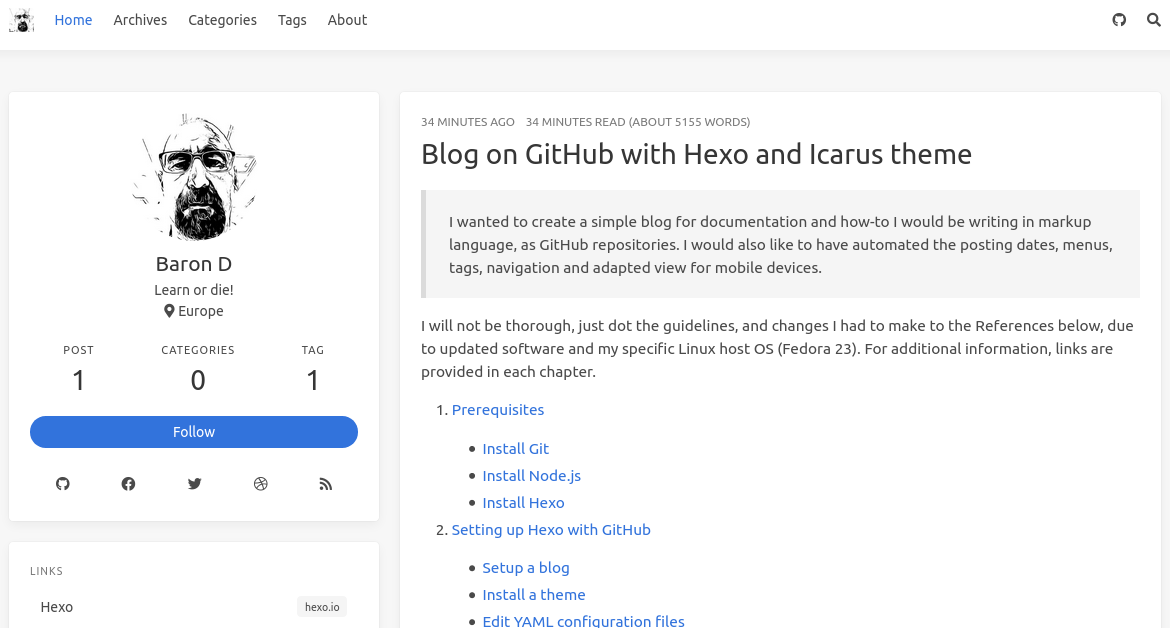
And this is the aspect of the blog before tinkering!:

3. References and Credits

This document is based on the following resources. I really thank the authors for sharing their knowledge and trouble:
4. Summary

  • Objetive: Simple yet powerful blog deployment using static GitHub Pages service.